

Being a parent, ensuring a child’s digital safety and well-being is crucial. Unfortunately, kids have access to unprecedented information through various online platforms. Maybe, it’s beneficial, but it also exposes potential dangers including porn websites, adult-theme cartoons and movies, explicit music, videos, social media, games, and other age-inappropriate content. Block inappropriate content on your child’s device to create a safer digital environment and reduce exposure to explicit websites, harmful apps, and age-inappropriate media.
With children spending more time online for learning, entertainment, and social interaction, parents need reliable ways to manage what their kids can access. It has become hilarious as a study shows 90% of kids ages 8-16 see pornographic content on Google, Safari, Firefox, and other mediums.
Thus, parents want peace of mind by restricting inappropriate and adult content. Let’s figure out how to block. This comprehensive guide will help to block inappropriate content with OgyMogy, its setup, use, and effectiveness of features.
What Is Inappropriate Content Online?
Inappropriate content is material that comes with offensive and explicit data. They may write text, pictures, and videos, and anything they watch online is unsuitable for their age when kids become a part of social media and spend more time online. So, it’s possible that they can access every type of content. It depends on what they see because the internet has both types of content. The explicit content is shown on video games and kids’ cartoon with adult scenes and promotes self-harm situations. When they watch, it makes them depressed, confused, and feel upset.
Online Activities Can Increase Your Child's Chance of Seeing Inappropriate Content
Here are a few things that help you to identify that your child may encounter inappropriate content.
- Spend more than 8 hours with digital devices
- Active on social media platforms and spend more time
- Play Online gaming that is not suitable for their age group
- Spend time watching live-streaming video shows and podcasts with double-meaning titles
Statistics About Kids Facing Explicit Content Online
Research from Ofcom provides insight into the online experiences of children. According to their findings, one in ten children aged 8-11 who go online report seeing something nasty or worrying. Additionally, Ofcom reports that one-third of British children aged 12-15 have encountered sexist, racist, cyberbullying or discriminatory content.
The NSPCC provides further data, revealing that 56% of 11-16 year olds have seen explicit material online.
The brief research shows that kids encounter explicit content online by exploring the digital world.
Types Of Inappropriate Content or Harmful Content Kids May Encounter
When exploring the internet, children face inappropriate content. So, here we’ll discuss the types of explicit content that hit your kids’ well-being.
Edited Or Filtered Images and Videos
Online platforms provide the facility to filter images and videos. Some filters are used to edit pictures and videos for fun. So, when kids use these revised filters to make possible changes in their appearance and physicque, they raise the beauty standards, which is not always acceptable. Moreover, sometimes this kind of filter is used to edit their videos and pictures to blackmail others, affecting their behaviour and mental health.
Fake News, Hoaxes, And Misinformation
Our digital and social platforms make sharing and approaching world news easy today. But it can be challenging to see what our kids see and how they make opinions about different issues. Additionally, it is difficult to identify the authentic source of news. Because online platforms also spread false information and misguide people, impacting their behaviour and mental well-being.
Online Porn
Our children and adolescents are curious about the sexual relationship and want to know more about it. Therefore, they search online to answer themselves. Because they feel embraced to ask their elders and parents so, they find it online. On the other hand, it is difficult for parents to talk about porn and their harmful side effects. But it is risky for kids to have access to pornography and see explicit content, which can affect their behaviour.
Promotion Of Self-Harm, Suicide, And Eating Disorders
The Internet is a place where people can find many things for themselves. It helps to come out from depression and feelings of upset. But it also gives information with harmful graphic content and which may include eating disorders and develop suicidal thoughts, especially during adolescence.
Violent Or Distressing Content
We know the internet has many benefits, but it is also unsafe for young people. When your child goes online, they might access the content that upsets them. This content includes racism, terrorism, harsh language, bullying, and hate speech.
What are the Dangers of Adult Content for Kids
The internet is not just a place, it’s a potentially dangerous territory for everyone, especially children. The threat of encountering inappropriate content is real and immediate, with excessive screen time leading to study distraction, anxiety, depression, and more. Understanding these risks and the potential harm of adult content for kids is not just necessary, it’s vital.
Therefore, parents must take the lead in being fully aware of the threats their children may face online and how to effectively protect them.
Lean how to identify adult content and explore the possible solution of OgyMogy to monitor and block inappropriate content. But perhaps the most crucial safety measure is fostering open communication with your child, building a strong foundation of trust and understanding about their online experiences.
1. Negative Behavioral Influence
Negative behavioral influences on kids can be from different platforms and various sources. Children are exposed to violent content on the internet and social media, which leads them to aggressive behaviors.
Another factor is digital media, which contributes to creating unrealistic standards and causes body shaming, low self-esteem, disrespect, depression, and anxiety.
Moreover, peer pressure can be the cause of risky behaviors like skipping school, smoking, clubbing, and maybe drinking.
This behavioral change leads children to long-term problems or may affect their mental health. Therefore, parents should know the dangers and take proactive steps for children’s positive development.
2. Mental Health Issues
Mental health issues are increasing in children with the involvement of the internet and online platforms. Spending hours on the internet can lead to long-term effects on children’s mental health, including Anxiety, fear, Depression, sadness, and Desensitization to harmful content.
More than 80% of kids face mental disorders due to accessing inappropriate content. This mental problem can impact their overall health and daily life routine.
No doubt, it’s a sensitive and necessary topic that addresses the children’s issues and enables parents to help create a supportive and positive environment and promote mental well-being. Remember, the mental issue is not only a problem; some aspects must be highlighted.
3. Decline Academic Performance
Decline academic performance in kids’ lives can be attributed to various factors, including mental health issues. When children spend a lot of time on digital devices and the Internet, they miss school and study. That’s become the cause of study ignorance.
Parents should support children in educational activities with the possible resources in this situation. After mental and behavioral changes, academic issues also raise issues that need to be addressed and balanced with positive behaviors and professional help.
4. Sleep Disruption
Exposure to sleep problems among children can significantly impact their sleeping patterns. The lack of restful sleep can profoundly affect their daily lives. Exposure to content such as horror movies and violent images can lead to nightmares, making it difficult for them to sleep.
Disturbed sleeping patterns can also impact their physical health and weaken their immune system. Therefore, it is crucial to maintain a consistent bedtime to promote overall health.
5. Unrealistic Expectations and Body Image Issues
The internet and social media can lead children to develop unrealistic expectations and promote body shaming. Various social media platforms, particularly Instagram, often portray a lifestyle that is far from reality.
Children, influenced by these images, may feel the need to conform to these unrealistic standards, leading to issues with self-esteem, negative self-growth, and unhealthy behaviors.
It is crucial for parents to step in and educate their children about the importance of balance, real beauty, and the differences between online and offline life.
6. Social and Relationship Problems
The consequences of inappropriate content on a child’s social and relationship skills are significant. The presence of social media accounts and constant interaction with strangers can lead to conflicts and social isolation. This can result in a child who prefers online relationships, thereby withdrawing from real-life interactions.
The implications of this issue extend to children’s mental health, sleep patterns, and academic performance. It is essential for parents to take proactive steps to address this issue, such as seeking professional help or engaging in direct communication.
By doing so, they can empower themselves to lead their child towards a more comfortable and balanced life, taking on the crucial role of a guide in their child’s digital journey.
7. Increased Risk of Cyberbullying
Excessive approaches to the internet can increase the risk of cyberbullying among kids. When exposed to violated or dangerous content, they permanently adopt the behaviors. Sometimes, bullies target them on different social media platforms, chat rooms, or gaming apps.
Where they hurt children through harassment, threats, negative comments, and body shaming, this may lead them to serious health issues, including anxiety, depression, loneliness, and low self-esteem. It is an alarming situation; thus, parents should be educated about the danger of cyberbullying and disrespectful behavior.
8. Early Exposure to Adult Themes Danger
Early exposure to adult themes significantly harms kids’ lives and positive development. When children encounter adult/explicit content, porn video, sexual seen, and violated language, it leads them to service problems. Adult theme impact on children leads to anxiety, loneliness, and other mental issues and affects their overall growth.
9. Addiction and Overdependence
Inappropriate content leads kids to addiction and over-dependence on social media. Undoubtedly, social media is engaging in nature to attract kids. They spend unlimited hours on entertainment, which increases their screen time and unhealthy reliance on the online world.
This overdependency leads them to problems, including poor social skills, lack of academic issues, depression, low self-esteem, and more. Thus, parents should seek professional help to protect their kids and give them a healthy and positive environment.
How to Identify Inappropriate Content for Kids
Identifying inappropriate content for kids requires a vigilant approach. Start by recognizing your child’s age and the content theme they access. Then, review the content to gain insight into what could be potentially harmful for them, such as x-rated and adult sites, explicit and violated language.
To ensure their safety, set parental controls to secure your kids from exposure to inappropriate online content. Additionally, observe your child’s behavior for any changes. This will help you find proactive solutions to prevent them from accessing inappropriate content and create a safe digital environment.
How to Have Open Conversations with Your Child About Online Safety
Open communication with your child is safe and important for their digital well-being. We’ve some key points that help you describe the effective way to educate your child on staying safe online.
- Choose the Right Time and Place: When discussing online safety, remember that you, as a parent, play a crucial role. Choose a comfortable and relaxed environment to open a dialogue with your child, empowering yourself to guide them through this digital world.
- Use Appropriate Language: Use simple and age-appropriate language while talking with your child to ensure an understanding of online safety.
- Openly Communicate: Open communication with your children about digital dangers, make them comfortable and encourage them to discuss their online experiences.
- Be a Role Model: Remember, children learn by observing their parents’ actions. By adopting good online habits, you can motivate your child to do the same and avoid suspicious activities online. Your actions can make a significant difference in their online safety.
- Set Clear Boundaries: As a parent, it’s your responsibility to monitor your child’s activities and establish boundaries that limit their use of digital devices and the internet.
- Use Professional Help: Parental controls are a good option for parents to manage and control kids’ activities and set a protection layer.
How To Explain Inappropriate Content Online in Age-appropriate Way
We highlighted the sensitive issue of modern times and the need to discuss it with kids. After many days of research, I have come to an end. The right way is to use the different terminology associated with the kids’ age group. So, we discuss its age-appropriate with the correct language. Here is a conversation with the children’s age group to avoid inappropriate content and prevent online harm, ensuring the discussion is appropriate for their age.
Ages 3–5
This age of kids is too young to understand the internet. So, being parents, don’t leave the kids alone with digital gadgets or the internet. Even if they watch cartoons or poems, keep them with them and check their devices to safeguard them.
Ages 6–8
Children of this age can be exposed to sexual content. They can encounter explicit content when they spend time on digital devices instead of on the playground and with their friends. So, setting rules for using the internet and digital devices in your home is crucial to keeping your child safe. And parents need to discuss the importance of physical activities and family settings with respectable manners.
Ages 9–12
This age is considered sensitive because kids grow up and learn more through their environment and the online world. Most of the child get their cell phone in this age group and get an opportunity to use the internet alone. But at that time, you’ve to review your family rules. Make a discussion and tell the value of family and career goals and teach the boundaries. And you’ve to communicate if your child is in trouble, tell you first.
Ages 13–18
Now your child may have some online influencers, which is fine. If your child wants to find something to explore the world, do it. But it needs to tell the online safety. And build trust that they mean everything to you without fear of losing their devices. Being parents, you’ve to support them if they get into trouble or face exposure to harmful content.
What are Educational Resources for Safe Internet Use
It’s important to remember that learning about safe internet practices can be an enjoyable and engaging experience for both children and parents.
There are numerous educational resources available, along with various media channels and applications that provide kids with academic and informative content.
Furthermore, there are animated YouTube channels specifically designed to help kids learn about online safety and guide them away from inappropriate content.
How to Get Professional Help and Guidance
Seeking professional support is a reassuring step towards safeguarding your children from online dangers and threats. By following the expert guidance, you can significantly enhance your child’s online safety.
- Consult cyber security help
- Consult the child’s psychologist
- Join safety community
- Leveraging government resources
- Use parental controls
How to Create a Balanced Digital Diet
In today’s digital age, maintaining a balanced digital diet for your children is not just necessary, but crucial. Here are some tips to help you fulfill your role in balancing your child’s digital life.
- Encourage offline activities
- Set rules for online activities
- Create tech-free zone
- Monitor their online activities
- Discuss the online risk
- Use parental control monitoring software.
How to Recognize Signs of Content-Induced Stress
With the use of digital devices and the internet, stress and anxiety increase among children. Here are signs of content-induced stress.
- Sleeping problem
- Physical problems include headaches, muscle problems, eye strain, and sitting posture.
- Increase irritability
- Aggressive mode
- Feeling alone
- Social withdrawal
- Decrease productivity
The Impact of Inappropriate Content on Children
Kids are naturally curious and want to expose all hidden things on the internet. Undoubtedly, the internet is a wonderful place to learn and expose. But it can be risky for them while they use the internet and get access to every kind of content because they are unaware of the darker side of the internet and harmful material. Exposure to inappropriate content can have serious consequences for their well-being.
The most sensitive issue, different types of inappropriate and explicit content content on the internet, and how it can make your child worse.
How To Manage Your Child's Exposure to Inappropriate Content
When the word comes to handling a child’s online access to inappropriate content, most parents ban their kid’s internet for safety reasons. But it’s incorrect; the world will be more advanced, so- kids need to learn more. Therefore, make wise decisions, supervise their activities, and control their unwanted actions. What is essential to do:
Set Up Their Account Together
It’s not easy to settle kids’ online world. But never lose hope. Still, some things help you to do. First, you must set up an account accosted with your kid’s account to know their activities and interest.
Follow Age-Appropriate Accounts
Following age-appropriate content helps you to set information algorithms. Watching kids-friendly content with your kids will show in the future on your kid’s social media accounts.
Explore Settings Together
YouTube, Instagram, and TikTok have some filter settings that help your child see appropriate content. This may include videos, pictures, comments, ads, and more. Set kids’ content is best to prevent them from accessing unwanted content online.
Consider What Settings Are on Shared Devices
Account settings help you to show what content has been watched previously. So, keep this in mind while setting accounts and sharing devices at home.
Talk To Your Child
The most important is directly talk with your children. You’ve seen that what they watch online is not always good and accurate. Therefore, please help them to understand the variety of content that they watch online and its effects on their mental and physical health.
Age-Appropriate Content
Guide your child to use different search engines safely. Make it clear that they couldn’t download any software or visit any website without your permission.
Ways To Keep Your Child from Seeing Inappropriate Content Online
Here are ways that help you prevent inappropriate and harmful content from your kids and help you enjoy the online world’s safe side. Start discussing it!
Communicate With Your Kids
Talking with your child is essential. Because you cannot leave them with digital devices and the internet, that creates problems. So, always communicate with your child openly, make them comfortable while discussing the issues, and tell them clearly why to set online boundaries and rules.
Monitor What They’re Up To
Being parents, you can understand what online content your child should approach and what you should avoid. Therefore, create your strategy to keep an eye on them and watch what they do online and how they spend on their devices because you care about and want to give a healthy and positive environment with no extra restrictions.
Lead by Example
First, you must tell what content is appropriate for adults rather than kids. If you see that your child is watching adult sites and watch questionable content, they behave like that. So, you must set up their accounts and avoid accessing the unsafe sites they tend. Tell them about their online limits by giving real-life examples about viewing the content online.
Teach Them What to Do If They Encounter It
The above-mentioned help you to secure your child online. All the content they watch is according to their age and will never upset them. But here, it is important to tell if they face some of the content unsuitable. In that situation, guide them to press the block button and restrict access. And encourage them if they limit that content so that they can enjoy their online world.
Use Technology to Your Advantage
Using technology to handle the technology better. Controlling kids’ activities and making them safe with technology is the best weapon for a secure digital environment.
Privacy Settings: The online privacy setting is the first secure way to control kids’ access to unwanted sites. So, set some privacy settings to manage their online accounts to limit their access.
Parental Settings: One of the easiest ways to manage your child’s online safety is to block inappropriate content on kids’ devices. Many online applications offer built-in parental controls to restrict access to adult websites or content. However, to handle this effectively, it’s essential to use advanced parental control monitoring software. This technology helps you efficiently manage and monitor your child’s internet usage, ensuring they stay safe online.
Take A Proactive Step to Minimize This Issue
Protecting your child from unwanted content online is best to save with the help of a monitoring app. Use OgyMogy to handle this issue and protect your loved ones as much as possible. This app helps you to monitor your kids’ online activities with the correct use of digital devices.
You must install it on your loved one’s devices, monitor every activity, and securely watch from the control panel. You can notice your kids’ digital behaviors and support them from getting into trouble. It enables you to monitor every activity without knowing them and establish a safe digital environment for them.
What Is OgyMogy's Inappropriate Content Blocking Feature?
OgyMogy is a comprehensive monitoring software designed to assist parents in managing and controlling their children’s device usage and activities. This powerful tool allows parents to protect their children by blocking specific content such as gambling sites, unapproved social media apps, and adult gaming sites/apps.
By configuring the installation, you can create a safe digital environment tailored to your child’s age. OgyMogy filters explicit and harmful content restrict sites that could lead to cyberbullying and helps balance their real life and screen time. With OgyMogy, parents can effectively shield their children from inappropriate content, creating a safer digital life and providing peace of mind.
With OgyMogy, you can remotely monitor your children’s online actions and gain an overview of their online world.
Its wide range of features enables you to manage and control your kids online activities remotely blocking unapproved websites.
This includes blocking harmful sites, such as adult, X-rated, vulgar, and age-inappropriate sites. In essence, it empowers you to monitor and limit your child’s screen time, ensuring a healthy balance.
How to Block Inappropriate Content with OgyMogy?
Following are a few steps to block inappropriate content with OgyMogy:
Open the dashboard by visiting https://www.club.ogymogy.com and enter your email and password to log in.
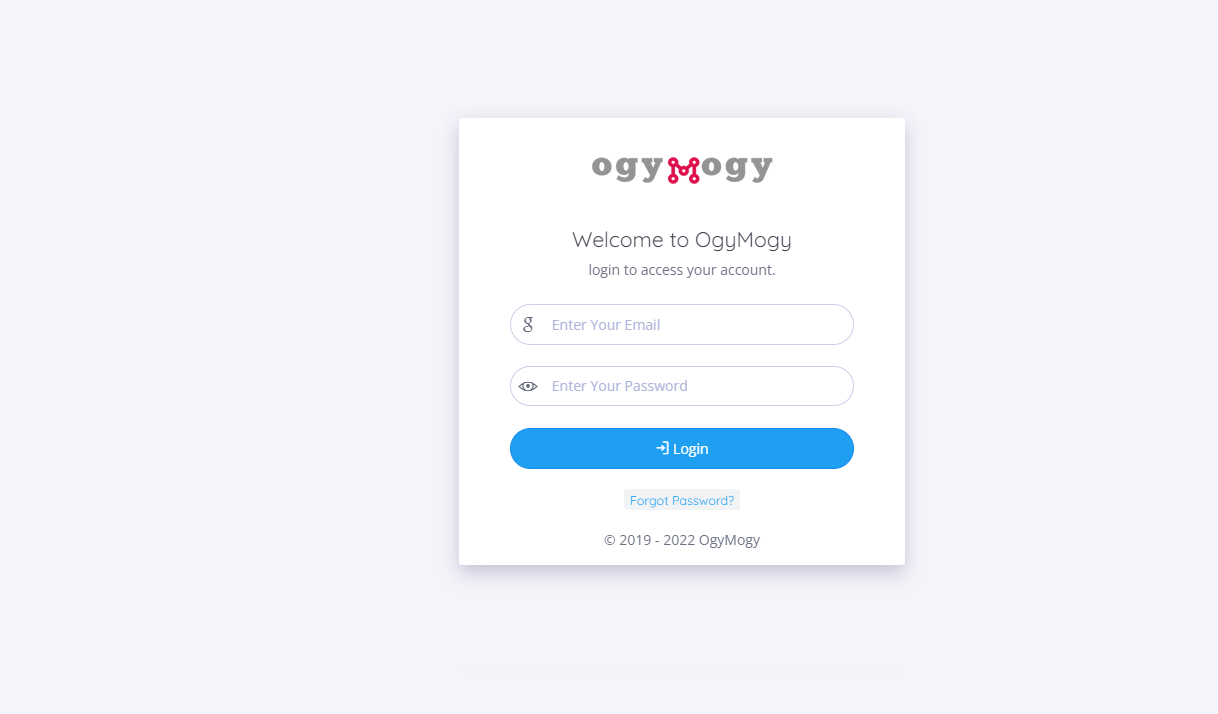
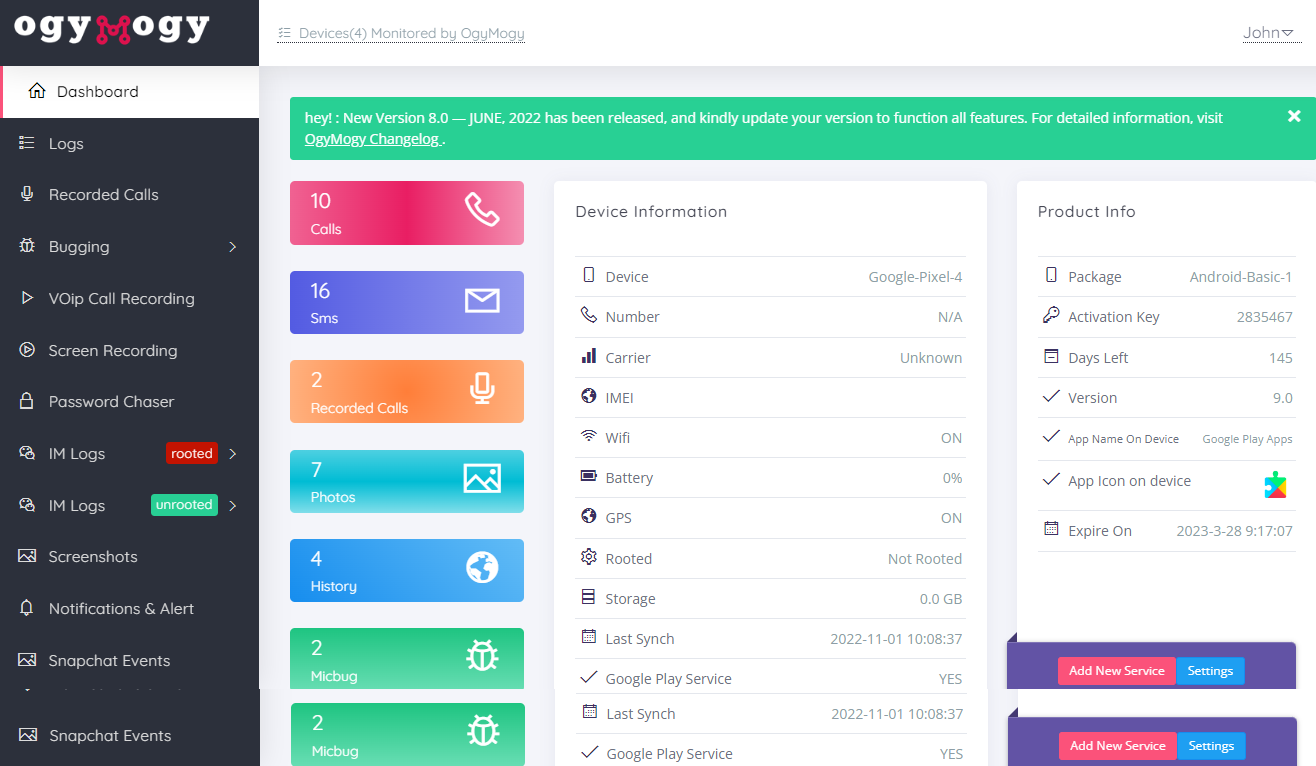
After logged in successfully, a dashboard page will be shown.
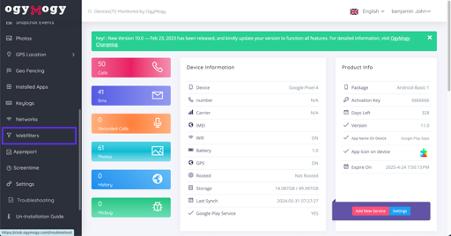
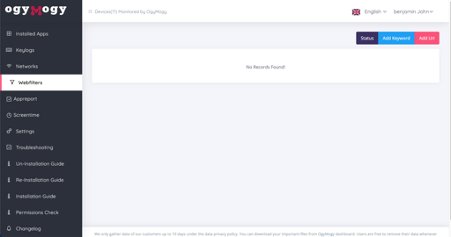
Scroll the side navigation menu find “WebFilters,” and Tap on it.
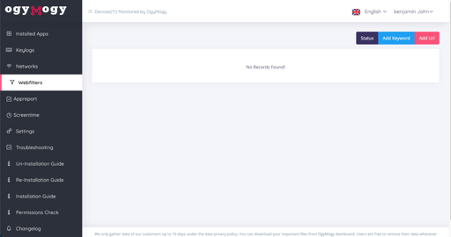
It will bring you to a new page. To add some keyword-specific filtration, please tap on the “Add Keyword” button.
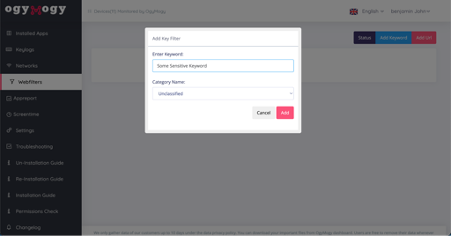
A dialog will be appear, put the keyword which you want to block on internet browsing and hit “Send” button
Now, to add some URL-specific filtration to your target person’s internet browsing hit the “Add Url” button
A new dialog will be shown. Put the URL of website, you want to block on the target device and hit the “Send” button
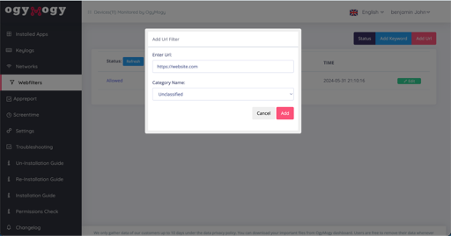
This will block content regarding the keyword or URL on the target device browsers
How to Monitor Your Child's Online Activity with OgyMogy?
Understanding how to use OgyMogy is essential for parents to restrict their kids’ device usage and prevent them from accessing inappropriate online content. By using OgyMogy to filter content, guardian can gain full control over their children’s cell phones, empowering them to protect their children’s digital well-being.
This comprehensive solution ensures that your child cannot access harmful content and does not spend excessive hours online. Ogymogy also sends alert notifications on suspicious activity, accompanied by a complete device usage report. This allows you to easily monitor their activities and initiate open communication about their digital safety.
Tips for Having Open Conversations with Your Child About Online Safety
Here are some tips for parents on having open conversations with their children about online safety. It’s important for guardians to communicate openly with their kids about the dangers and how to stay safe online.
- Setting rules about device usage and discussing the dangers of talking to strangers and sharing personal information such as pictures, home addresses, school addresses, and bank details can help protect children from online threats.
- Explain the digital dangers such as cyberbullying, online predators, age-inappropriate content, and sexual harassment, and discuss why online safety is important.
- Set clear boundaries and controls on children’s device and internet usage. Provide guidelines for social media and filter websites on their devices such as smartphones, tablet, laptop, desktop and gaming consoles.
- Educate them on using privacy settings on social media and other online platforms. Emphasize the significance of safeguarding personal information.
- Sharing real-life examples or relatable incidents can make the conversation more impactful and help drive home the significance of staying safe online.
Maximizing the Effectiveness of OgyMogy
Ensuring the safety of children in the digital age is paramount. Ogymogy provides a comprehensive solution with highly effective features. Follow the provided guide to install and utilize this application. Additionally, you can use the tips to engage in open communication about online dangers and safety measures, thereby ensuring the well-being of your children in the digital world, a cause that should motivate and commit you. Further, you can follow the tips to safeguard your children through open communication about the dangers with safety measures to ensure kids’ digital well-being.
OgyMogy Features: A Detailed Overview
Key Features of OgyMogy:
- Social media monitoring enables you to check kids’ instant messaging activities, including chats, calls, and shared multimedia, to detect any suspicious activity.
- View which websites kids visit and know how much time they spend on them. If they are accessing inappropriate websites, you can block them to prevent access.
- Check kids’ devices’ internet activities to see which websites they have visited and view their bookmarked pages.
- Restrict kids’ device usage by controlling screen time to help them establish a healthy online routine.
- Use the app usage feature to see which apps they use and remotely uninstall unapproved apps from their device.
- Track children’s locations to review their movement history and and mark the safe and restricted areas.
Conclusion
It’s not possible to stay away your kids from the internet. But it’s in your hand to keep them safe using different techniques. We mentioned as much above to secure kids from accessing inappropriate content. But if you trust on OgyMogy, you’ll stop your child from online danger and secure them in the digital world. Plus, you’ll get peace of mind regarding your kids’ safety. Therefore, setting up OgyMogy on your child’s gadgets is a proactive step towards monitoring their digital activities and taking comprehensive action to secure them.
Utilize parental control software or built-in settings on devices to filter and block inappropriate content. Regularly communicate with your child about online safety and the importance of avoiding harmful material. Stop inappropriate content by managing your kids’ activities and choosing advanced help from monitoring software like OgyMogy.
The exposure to unsuitable and risky content on social media for kids. It may include sexual, aggressive, and violated comments, nude pictures, and videos on posts. The risk of online bullying and harassment. Support your child emotionally and let them know that it’s not their fault. Report the cyberbullying to relevant platforms, schools, or authorities if necessary. Encourage your child to confide in a trusted adult and consider seeking professional help if needed.
Yes, there are child-friendly browsers and search engines designed to filter content and provide a safer online experience for children. Some popular options include Pikluk, Kidoz, Zac, Kidzui, Maxthon, Kidsurf, KidzSearch, KidzUI, and Zoodles.
Teach them about critical thinking and media literacy. Encourage them to question the content they encounter and consider the source and intent behind it. Discuss the importance of privacy and potential risks associated with sharing personal information. Teach them to be cautious and limit the information they share, especially with strangers.